How I Built DuoRead?
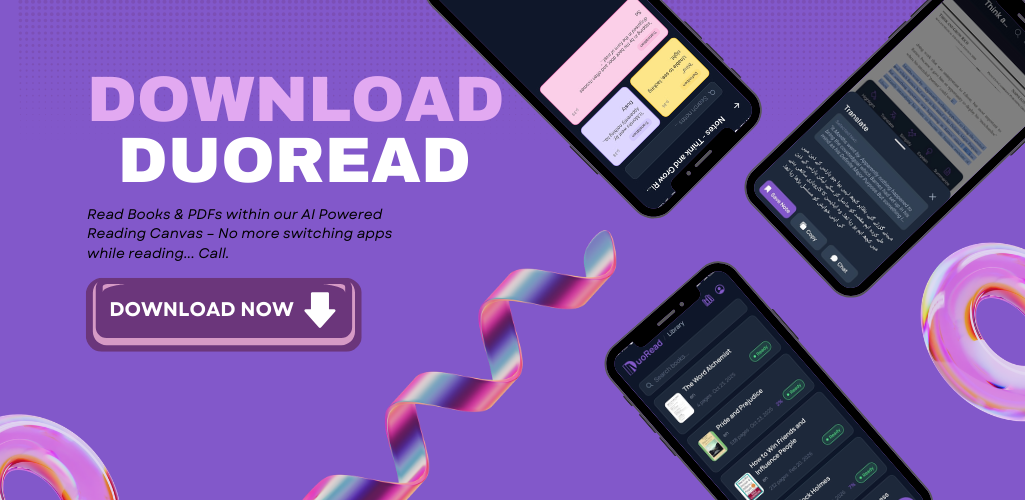
I've built many products before. But DuoRead is the first one that impressed everyone I showed it to — and the first one I actually use every single day myself.
This post is the long, honest, technical version of the story: what I built, why I built it, the exact tech stack, the architecture decisions, the problems that nearly broke me, and how it finally went live on both web and mobile (Play Store) after roughly 6 months to a year of work.
If you just want the one-liner:
DuoRead turns static books and PDFs into a dynamic AI canvas — with an AI tool bar and a side-running DuoRead Agent.
Let's get into how it was actually built.
1. The Problem I Was Trying to Solve
I read a lot. Books, novels, research PDFs, documentation — most of it in English, which isn't my native language. And every serious reading session looked the same:
- Hit a hard word → switch to Google Translate.
- Don't know how to say it → switch to Google Pronounce.
- A paragraph is too dense → paste it into ChatGPT or Gemini to simplify.
- Need context on a concept → open Wikipedia.
- Found something worth keeping → switch to a Notes app.
By the time I came back to the book, my flow was gone. I'd lose the thread, get tired, and abandon the book halfway. Millions of people do exactly this every day.
So the thesis behind DuoRead was simple:
What if every one of those actions happened on the same screen as the text — without ever leaving the page?
That single constraint — never break the reader's flow — drove every technical decision that followed.
 The "one screen for everything" idea.
2. What DuoRead Actually Does
Before the architecture, here's the feature surface, because the stack only makes sense once you know what it has to support:
- DuoRead Agent — a side-running chat agent that knows the book you're reading. Ask it anything.
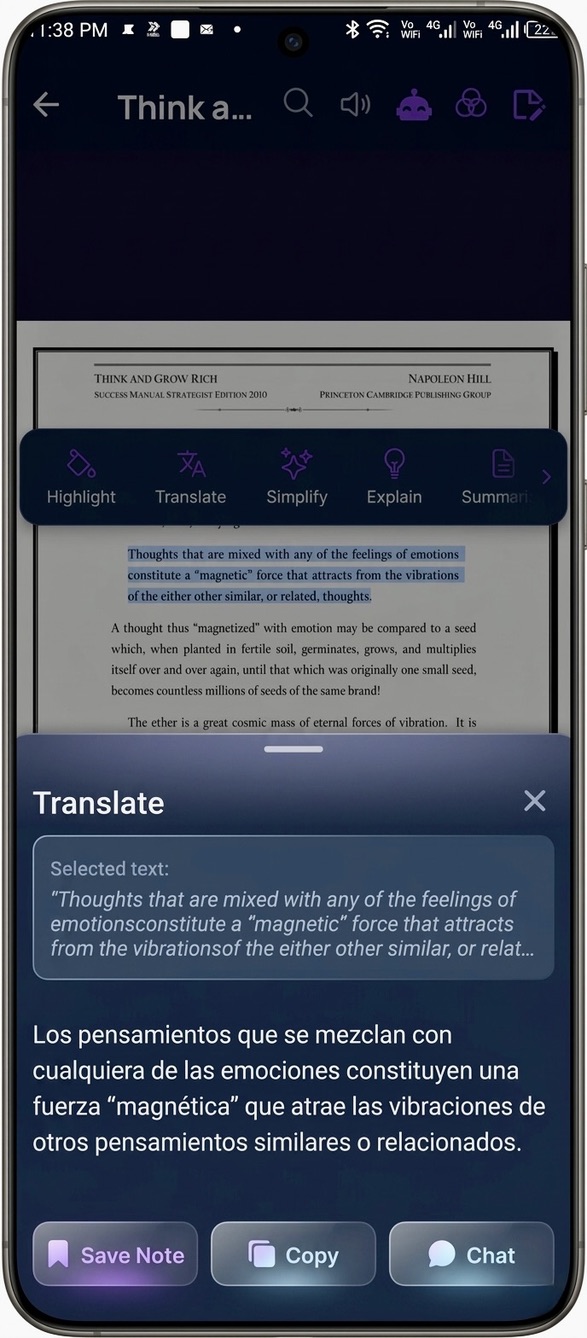
- Translate — translate any selection into your native language.
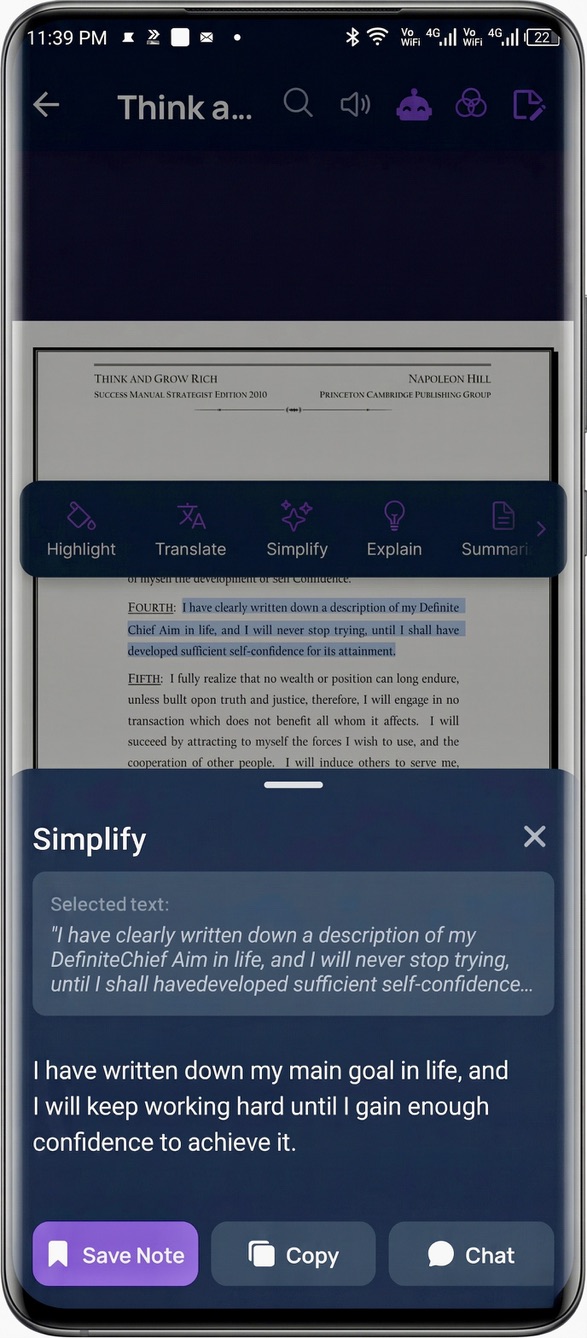
- Simplify — rewrite complex sentences in plain words.
- Summarize — compress long passages.
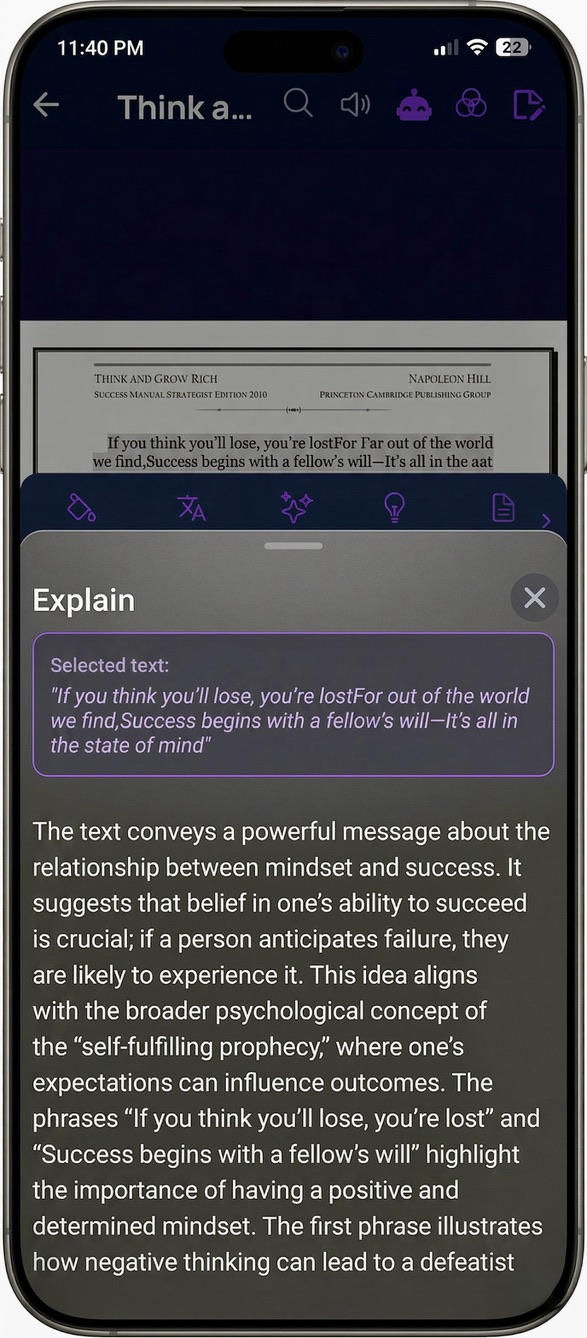
- Explain — explain a concept with the surrounding context, not in a vacuum.
- Define — instant definitions for words and terms.
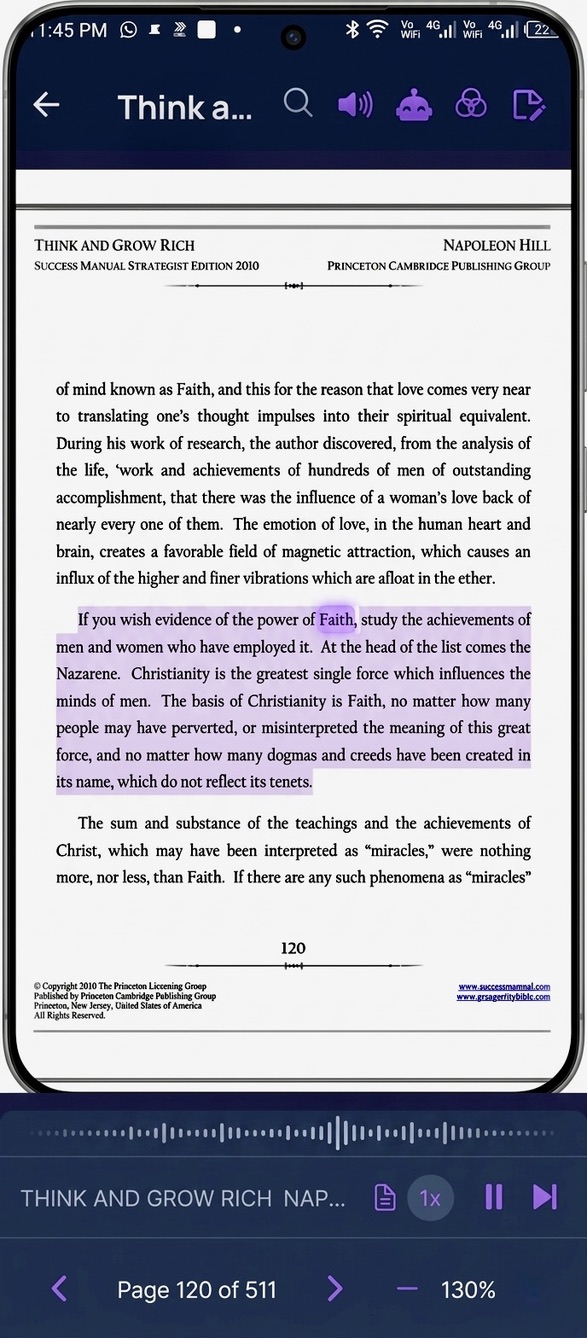
- Pronunciation & Read Aloud — hear a word, or have a whole page read to you.
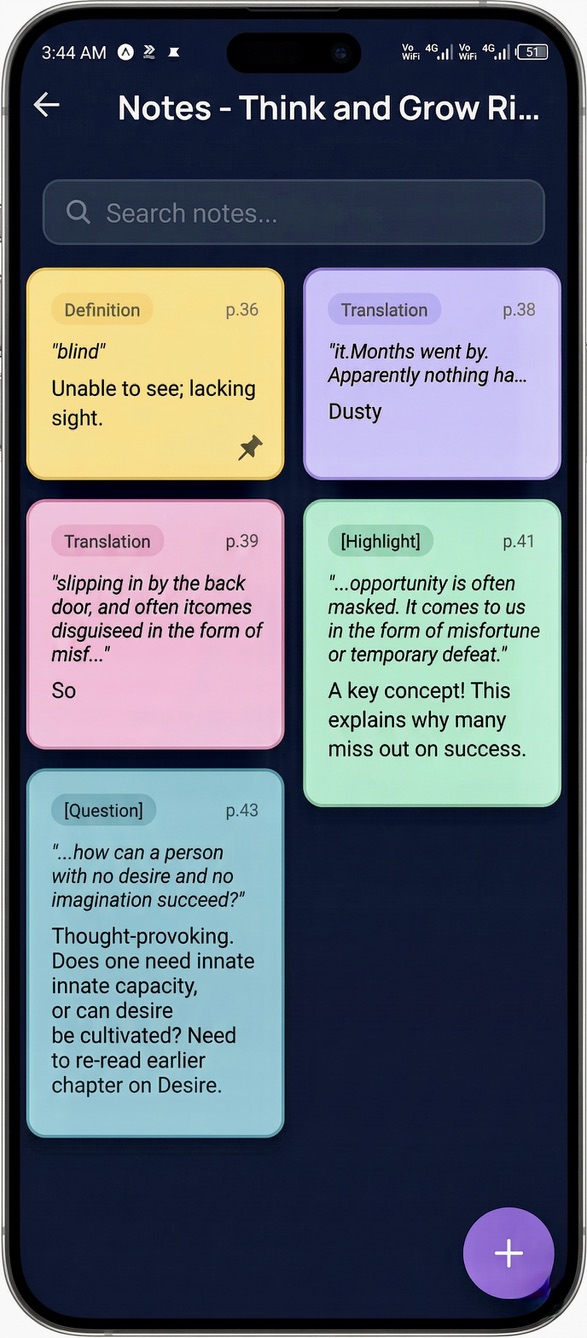
- Sticky Notes — save thoughts and highlights right on the page.
- Dual Modes — Offline Mode and Hybrid Mode.
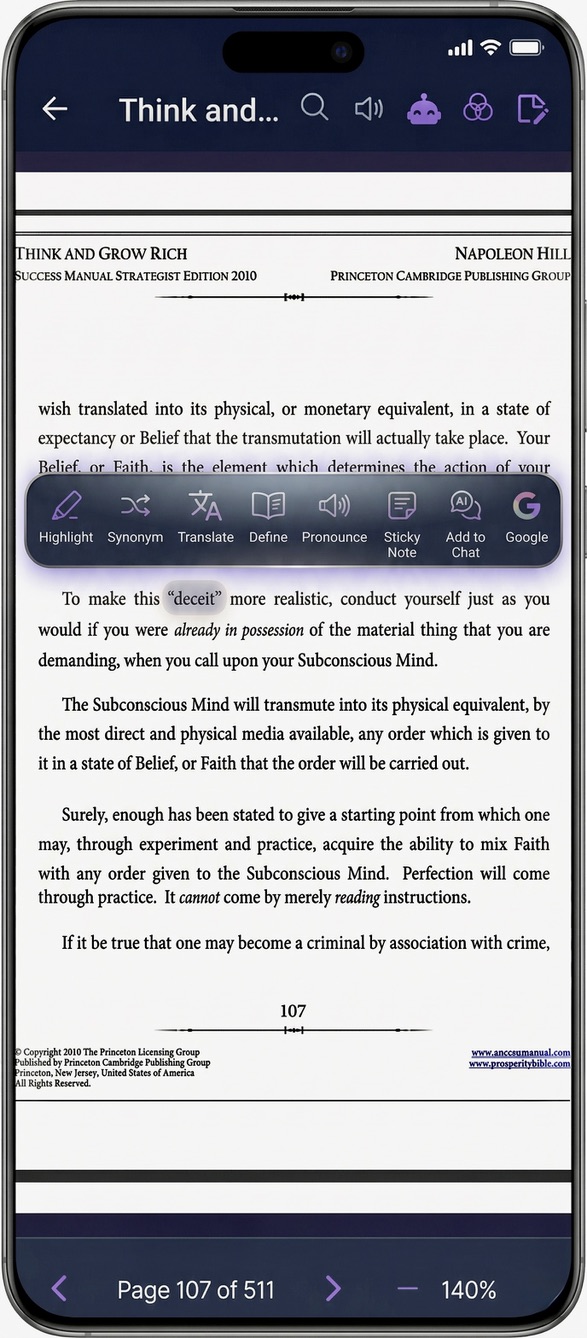
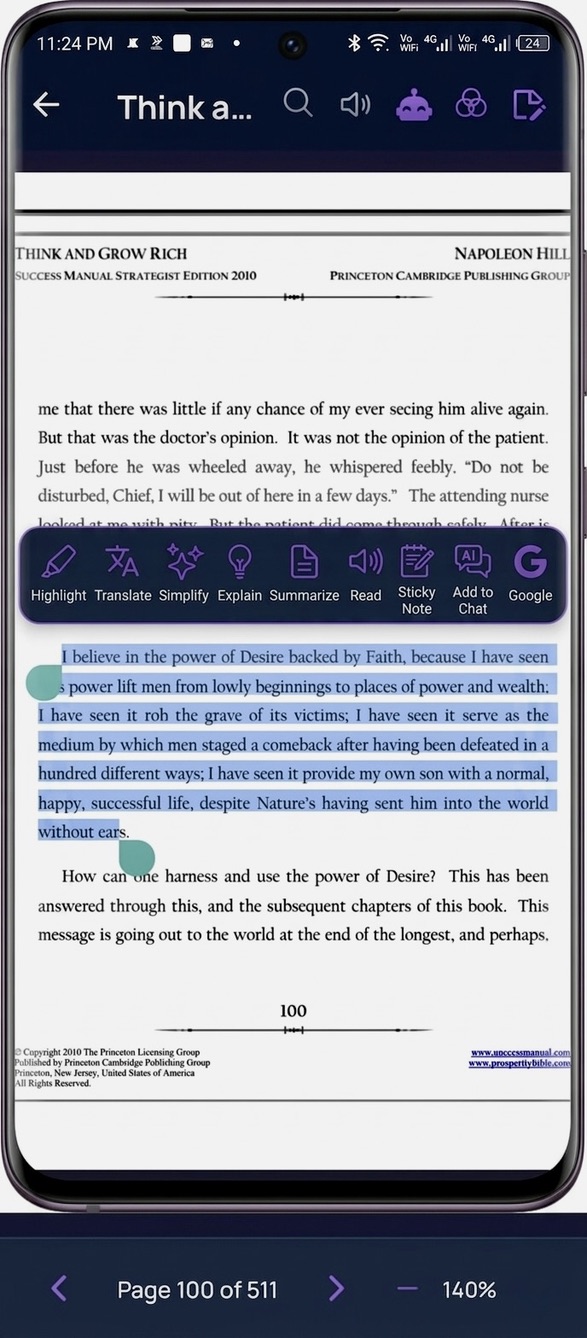
The core interaction is this: select text → a context-aware tool bar floats up → pick an action → the result appears inline, in a panel, beside the text. The book never disappears.
3. The Architecture (Bird's-Eye View)
DuoRead is three codebases that share one backend:
┌─────────────────────┐     ┌─────────────────────┐
│   Web App (React)   │     │  Mobile (React      │
│   Vite + TS +       │     │  Native + Expo)     │
│   Tailwind + shadcn │     │  Android / Play     │
└──────────┬──────────┘     └──────────┬──────────┘
           │                           │
           │      HTTPS / SSE          │
           └─────────────┬─────────────┘
                         ▼
        ┌──────────────────────────────────┐
        │   Backend — FastAPI (Python 3.13)│
        │   • LangChain + LangGraph Agent  │
        │   • RAG over pgvector            │
        │   • JWT Auth                     │
        └───┬───────────┬──────────┬───────┘
            ▼           ▼          ▼
     ┌──────────┐ ┌──────────┐ ┌──────────────┐
     │ Postgres │ │ MongoDB  │ │ Cloudflare R2│
     │ +pgvector│ │ (agent   │ │ (book / PDF  │
     │ (RAG +   │ │ memory   │ │ file storage)│
     │  data)   │ │ checkpts)│ │              │
     └──────────┘ └──────────┘ └──────────────┘
Three clients, one brain. Let me break each layer down.
4. The Frontend — A "Canvas," Not a Reader
The web app (DuoRead-FE-C) is a React + TypeScript single-page app built with Vite (using the SWC compiler for fast builds).
Key choices:
- Tailwind CSS + shadcn/ui (Radix UI primitives) for the entire design system — dialogs, popovers, tooltips, the floating command bar, sliders for read-aloud speed, etc. Radix gives accessibility and keyboard handling for free, which matters a lot for a tool you live inside for hours.
react-pdf+pdfjs-distto render PDFs in the browser. This is where a static document becomes a selectable, interactive surface.react-resizable-panels— this is the unsung hero. It's what makes the "book on one side, AI on the other" split-canvas layout draggable and resizable. The whole "side-running agent" UX depends on it.- TanStack Query (React Query) for all server state — caching, retries, and keeping the UI snappy while the backend thinks.
react-markdown+remark-gfmto render the AI's responses (summaries, explanations, agent chat) as rich, formatted text instead of a plain blob.react-router-domfor navigation,react-hook-form+zodfor typed, validated forms, and Google OAuth (@react-oauth/google) for sign-in.
 The web reading canvas.
The hardest frontend problem was text selection across a PDF layer. PDF.js renders an invisible text layer over the canvas, and getting the exact selection coordinates — so the floating tool bar appears in the right place, anchored to the right words — took a lot of iteration. The single-word vs. multi-word bar you saw above are two different selection states that had to be detected reliably.
5. The Mobile App — React Native + Expo
The mobile app (DuoRead-Mobile) is built with React Native + Expo, which let me ship to Android (Play Store) from the same mental model as the web app.
The Expo modules doing the heavy lifting:
expo-speech→ powers Pronunciation and Read Aloud. On-device text-to-speech, no network round trip needed.expo-document-picker+expo-file-system→ let users import their own PDFs and store/cache them locally.@react-native-community/netinfo→ detects connectivity, which is the trigger for Offline vs Hybrid Mode (more on that below).expo-secure-store→ secure token storage for auth.expo-haptics→ subtle tactile feedback on the tool bar (I spent a surprising amount of time tuning this — there's even a haptic feedback plan doc in the repo).react-native-purchases(RevenueCat) → subscription / in-app purchase handling.react-native-webview,react-native-markdown-display/react-native-render-html→ rendering documents and AI markdown responses.@react-native-google-signin/google-signin→ native Google sign-in.- TanStack Query + axios + zod → shared data-fetching patterns with the web app.
6. The Backend — Where the "AI-Native" Part Lives
This is the part I'm proudest of. The backend (DuoRead-BE) is Python 3.13 + FastAPI, served by Uvicorn, fully Dockerized.
The route layer is cleanly split by feature — auth, books, chat, sticky notes, highlights, word bank, analytics, notifications, and webhooks — each backed by SQLModel over PostgreSQL, with JWT auth and slowapi rate limiting in front.
But the interesting part is the AI layer.
6.1 The DuoRead Agent — LangChain + LangGraph
The side-running agent isn't a thin wrapper around a chat completion. It's a proper LangGraph agent:
- Built as a
StateGraphwith a model node and aToolNode, wired withtools_conditionso the agent can decide when to call a tool versus answer directly. ChatOpenAIas the reasoning model.- MongoDB checkpointer (
langgraph-checkpoint-mongodb) so each conversation has persistent memory — you can close the app, come back, and the agent still remembers the thread for that book. - Responses are streamed to the client over SSE (Server-Sent Events), so the agent feels alive — text appears token by token instead of after a long pause.
6.2 RAG — How the Agent "Knows" Your Book
This is what makes Explain and the agent context-aware instead of generic:
- On upload, the PDF is parsed with PyMuPDF / pypdf.
- Text is chunked with
RecursiveCharacterTextSplitter(≈800-char chunks, ~80-char overlap). - Chunks are embedded — I run
sentence-transformers/all-mpnet-base-v2(768-dim) via HuggingFace, with OpenAI embeddings also wired in. - Vectors are stored in PostgreSQL with the
pgvectorextension, so retrieval is a similarity search right next to the relational data. - At query time, the agent retrieves the most relevant chunks and grounds its answer in your actual book — not the open internet.
That's why "Explain this concept" gives you an explanation rooted in the paragraph you're reading, with the surrounding context, instead of a Wikipedia-flavored guess.
6.3 Supporting Infrastructure
- Cloudflare R2 (via
boto3) → object storage for book/PDF files (S3-compatible, no egress fees). - Firebase Admin → push notifications to mobile.
- Brevo → transactional email for verification OTPs.
langdetect→ detecting the source language so Translate/Simplify behave correctly.- Deployed as a container (the Dockerfile uses
uvfor fast, reproducible dependency installs).
7. Offline Mode vs Hybrid Mode
One of DuoRead's differentiators is the mode toggle, and it's a deliberate engineering trade-off:
- Hybrid Mode — the full experience. The cloud agent, RAG, summarize, explain, and the side-running chat are all live. This is where the heavy AI reasoning happens.
- Offline Mode — built for reading without a reliable connection. Locally cached documents, on-device features like pronunciation and read-aloud (via
expo-speech), highlighting, and sticky notes keep working.netinfodetects the network state so the app degrades gracefully instead of just breaking.
The principle: reading should never depend on a signal bar. AI augments the experience when you're connected; it doesn't hold the basics hostage when you're not.
8. The Problems That Nearly Broke Me
No honest build story is just a victory lap. The hard parts:
-
PDF text selection & coordinate math. Anchoring a floating tool bar to an exact selection — across PDF.js's text layer on web and a totally different rendering path on React Native — was the single most time-consuming UI problem. Single-word, multi-word, and cross-line selections all behave differently.
-
Streaming everywhere. Making the agent stream over SSE through FastAPI, then consume that stream cleanly on both a React web client and a React Native client (which handle fetch/streaming very differently), took real plumbing. There are dedicated streaming guides in the repo because I had to document it for myself.
-
RAG quality vs. cost. Chunk size, overlap, embedding model choice, and how many chunks to retrieve are all knobs that trade accuracy against latency and cost. Getting "Explain" to feel instant and grounded meant tuning all of them.
-
Agent memory at scale. Persisting LangGraph state per-conversation in MongoDB — so memory survives restarts without bloating — needed the checkpointer wired carefully.
-
One product, three clients. Keeping web, mobile, and backend in sync — shared validation (
zod), shared data patterns (TanStack Query + axios), consistent auth — is an ongoing discipline, not a one-time setup. -
Shipping to the Play Store. Build signing, store assets, screenshots, review compliance, and subscriptions (RevenueCat) are their own project on top of the engineering.
9. It's Live — Web + Play Store
After roughly 6 months to a year of building, breaking, and rebuilding, DuoRead is live on both the web and on Android via the Play Store.
It's the first product I've built that I open every single day — not to test it, but to actually read.

10. The Stack, At a Glance
| Layer | Technology |
|---|---|
| Web | React, TypeScript, Vite (SWC), Tailwind CSS, shadcn/ui (Radix), TanStack Query, react-pdf / pdfjs-dist, react-resizable-panels, react-markdown |
| Mobile | React Native, Expo, expo-speech, expo-document-picker, expo-secure-store, netinfo, RevenueCat, Google Sign-In |
| Backend | Python 3.13, FastAPI, Uvicorn, JWT, slowapi, Docker (uv) |
| AI / Agent | LangChain, LangGraph (StateGraph + ToolNode), OpenAI, SSE streaming, MongoDB checkpointer |
| RAG | PyMuPDF/pypdf, RecursiveCharacterTextSplitter, HuggingFace + OpenAI embeddings, PostgreSQL + pgvector |
| Data & Infra | PostgreSQL (SQLModel), MongoDB, Cloudflare R2, Firebase (push), Brevo (email) |
Try It & Tell Me What You Think
If you read books or push through a lot of documents — like millions of other people — DuoRead was built for you.
I'd genuinely love your feedback:
- What's good?
- What's bad?
- What should I improve?
- What should I add next?
Drop a comment or reach out. This is the product I always wanted to exist — and I'm just getting started.
— Zain
Muhammad Zain Attiq
Agentic AI Engineer • AI Agents • Freelancer